AI Assembly
The Machanism AI Assembly solution is a powerful tool designed to enhance and simplify the process of application development. Unlike generic AI tools that focus on generating arbitrary code, AI Assembly is tailored to work with the Machanism platform's curated library ecosystem. It utilizes Generative AI (GenAI) to assist developers in selecting and integrating the most relevant libraries for their specific use cases. By doing so, it enables the creation of practical, maintainable, and high-quality initial implementations, while ensuring that developers maintain oversight and control.
Introduction
AI Assembly is built upon a foundation of structured metadata and advanced semantic search capabilities. The solution revolves around the use of bindex.json, a standardized descriptor file associated with each library in the Machanism ecosystem. Here's how the process works:
-
Metadata Generation:
For every library, Machai automatically generates abindex.jsonfile by analyzing project artifacts such as build files (e.g.,pom.xml,package.json), source code, and other metadata. This file contains detailed information about the library, including its features, integration points, authorship, licensing, and example usage. -
Semantic Search:
Thebindex.jsonfiles are stored in a vector database, where their contents are indexed using semantic embeddings. This enables AI to perform highly efficient searches that match user queries based on intent, rather than relying solely on keyword matches. -
Library Selection and Assembly:
When a developer provides a natural language query describing their project requirements, AI Assembly leverages its semantic search capabilities to identify and recommend the most relevant libraries. It then generates a report containing suggested components, integration details, and initial configurations. -
Developer Oversight:
While AI Assembly automates much of the library selection and initial configuration process, developers remain responsible for verifying the generated code to ensure it meets their specific functional, security, and quality requirements.
Pick
When a developer submits a query describing their project needs, the semantic search engine scans the vector database to identify libraries and components that best match the user's intent. The results are ranked and presented to the user, who can review and select the most suitable options.

Assembly
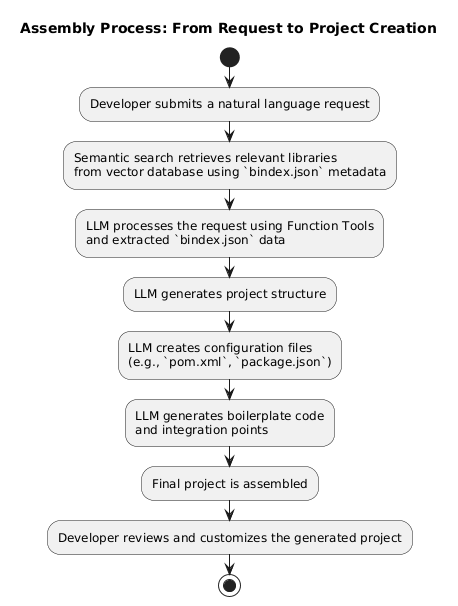
The assembly process in Machai is designed to simplify and automate the creation of application projects by leveraging Large Language Models (LLMs) and the structured metadata provided by the bindex.json files. The following steps outline how the process works:
-
Initial Request and Configuration The process begins when a developer submits a request describing the desired application. This request is written in natural language and includes high-level details such as the application's purpose, key features, and any specific requirements.
- Input Example: "Create a REST API application for managing a user login using Spring Boot and Commercetools."
- The system interprets this request and maps it to relevant libraries and configurations by utilizing the semantic search capabilities of the vector database storing the
bindex.jsonfiles.
-
LLM Request with Function Tools To generate the project's initial files, Machai employs Large Language Models with Function Tools. These tools enable the LLM to create the necessary project structure and files based on the developer's request and the metadata from the
bindex.jsondataset.- Key Steps:
- The LLM processes the developer’s request and extracts key parameters, such as the programming language, framework, and database requirements.
- It retrieves relevant libraries and components from the
bindex.jsondataset, ensuring that the selected libraries align with the project’s intent. - Using this information, the LLM generates the initial project files, including configuration files (e.g.,
pom.xmlfor Maven projects), source code files, and placeholders for additional implementation.
- Key Steps:
-
Project Generation The LLM uses the retrieved information and the developer's original request to generate the project. This step involves:
- Creating a Project Structure: The LLM organizes the project files into a standard directory structure based on best practices for the chosen programming language and framework.
- Generating Configuration Files: The LLM creates essential configuration files, such as build files (
pom.xml,build.gradle), dependency files (package.json), and environment-specific settings. - Initial Code Implementation: The LLM generates boilerplate code for the application, including entry points, API endpoints, and example usage of the selected libraries.
- Integration Points: The generated project includes integration points for the selected libraries, with clear documentation and example code snippets to guide the developer.
-
Final Output
Once the project is generated, the developer receives a ready-to-use project that includes:- A complete directory structure.
- All necessary configuration and build files.
- Initial code templates tailored to the project requirements.
- Integration details for the selected libraries, including example usage and customization options.
Developers can then review and modify the generated project as needed, ensuring it meets their specific requirements and adheres to their coding standards.